A 3rd redesign finally worked. Rebuilding Employee Trust by Design

A 3rd redesign finally worked. Rebuilding Employee Trust by Design

A workflow trust problem showed up as workarounds and caused customer complaints. The customer service team had attempted to redesign tools before, but I found the root cause and the redesign scored 86% employee satisfaction. The part that was missing before wasn't anything with the tool.

A workflow trust problem showed up as workarounds and caused customer complaints.

My Role

Sr. UX/UI Designer

Collaborated with Product Manager,Innovation Lead,Product owner, Analytics and Front-end developer

Collaborated with Product Manager,Innovation Lead,Product owner, Analytics and Front-end developer

14 months

50+ user stories

Avanade, client (global chemical manufacturer)

Project Profile

Project Profile

Project Profile

GlobalChemical Manufacturer

Global Chemical Manufacturer

Leading Chemical Manufacturer

Business Workflow Application

Business Workflow Application

Enterprise Software

Enterprise Software

  • Uncovered and presented deep human centered research insights that elevated the frame of the project from "improve design of workflow tool" to "build a tool to reimagine the CSR role"

  • Owned UX/UI design decisions from token design to hand off to the development team

  • Design patterns: complex drill down, next best action, personalized & customized workspace controls, present heavy data on responsive screens. Redesigned app CSRs can scan screen 5-6x faster

  • Name and design of "Finding Diamonds" a 15-week user adoption campaign to launch the app:
    from low tool usage problem → 80% adoption across ~600 global employees within six months

Background

Why did it matter?

Why did it matter?

The clients large enterprise customers including, Johnson & Johnson, General Mills, and ExxonMobil, complained about inconsistent customer support in the phone center and via the support portal on the online story. That put the project on the business's radar in the first place.

  • Two previous internal attempts to solve this had already failed, and neither Dow nor the consultancy knew why.

  • A separate internal Dow team was independently building a competing tool at the same time, with no shared visibility between efforts.

  • Design was legally barred from speaking directly with the CSRs who'd use the tool — a constraint set before the project started, not a choice made during it.

  • Onboarding was so broken that only 42% of new CSRs could hit performance quota after 30 days of training, and 68% needed a ~90-day mentorship to reach proficiency — an estimated $400K–$600K annual cost.


Problem Statement

Poorly integrated applications eroded employee trust in enterprise tools.

As a Customer Service Representative(CSR), I need to quickly identify which orders require action, so I can resolve issues without scanning through overwhelming amounts of irrelevant data.

legacy user experience

Customer Service Representatives (CSRs) struggled with outdated tools, causing operational chaos. Previous attempts at improvement fell short. Our expert team introduced a groundbreaking solution that transformed the workplace experience and ensured flawless customer interactions.

High

Cognitive Load

Low

Systems & Standards

Low

Work tool usage

business drivers for this product

Costs

Train & Mentor

Workflows so complex it required 90 day employee mentor program & training.

Risk

Brand Deterioration

Unmet Customer Expectation, Employee Silos, Untrusting culture

Waste

< 40% licenses used

Daily usage below average for enterprise software; based on Brad Feld "Rule of 40"

Problem Statement

Poorly integrated applications eroded employee trust in enterprise tools.

As a Customer Service Representative(CSR), I need to quickly identify which orders require action, so I can resolve issues without scanning through overwhelming amounts of irrelevant data.

legacy user experience

Customer Service Representatives (CSRs) struggled with outdated tools, causing operational chaos. Previous attempts at improvement fell short. Our expert team introduced a groundbreaking solution that transformed the workplace experience and ensured flawless customer interactions.

High

Cognitive Load

Low

Systems & Standards

Low

Work tool usage

business drivers for this product

Costs

Train & Mentor

Workflows so complex it required 90 day employee mentor program & training.

Risk

Brand Deterioration

Unmet Customer Expectation, Employee Silos, Untrusting culture

Waste

< 40% licenses used

Daily usage below average for enterprise software; based on Brad Feld "Rule of 40"

The Setup

What I was on the hook for?

What I was on the hook for?

What I was on the hook for?

What I Owned

workflow mapping, the proxy-based research method, screen Information Architecture, interaction design, final design screens,
interaction flows and feature design, the design token/component system, and developer handoff audits.

What I Did NOT Own

(constraints)

(constraints)

the legal policy barring direct user access,
at the time I joined the project the problem discovery had created a project brief, or we learned about a parallel build happening on the competing internal team (challenging useage).

Earned bigger role on the project & a promotion to senior designer

Outcome

read more

My role began on the design side building the components and screens and ramping up on research. I was promoted to sole owner of UX and UI after the PM commented on my confident handling of complex user stories and cross-functional coordination.

Research

My approach

I managed real world constraints & tensions.

I managed real world constraints & tensions.

Onboarding Challenge

Very quick ramp up; multiple consulting team reorgs

Minimal onboarding; multiple team reorgs

Consulting team interview

Collaborative Bridge

Legal Constraints

Client blocked access to users for research or testing

Proxy research sprints

Design Thinking

Complex System

Super Complex
System

10's of thousands of data points, more than 21 APIs

Tons of data; 1 week to get up speed

Desktop Investigation

Creative Research

Desktop Investigation

Creative Research

I used human-centered design methods to adapt my research plan

Outcome

I found that CSRs lost trust in internal tools because in past design attempts the tool experience made work more complex. Users then created workarounds.

I found these Hesitation signals

I found these Hesitation signals

Wasted time + money

68%

> 90 days Ramp Up

Wasted time + money

68%

> 90 days Ramp Up

Customer interaction

High

Response Variance

Customer interaction

High

Response Variance

Tool Sprawl

3 Tools

Decision friction

Tool Sprawl

3 Tools

Decision Friction

Onboarding Challenge

Minimal onboarding; multiple team reorgs

Cross-functional interview

Collaborative Bridge

Legal Constraints

Client blocked access to users for research or testing

Proxy research sprints

Design Thinking

Super Complex System

Tons of data; 1 week to get up speed

Desktop Investigation

Creative Research

I used human-centered design methods to adapt my research plan

Outcome

I found that CSRs lost trust in internal tools because in past design attempts the tool experience made work more complex. Users then created workarounds.

Hesitation signals

My Approach

Managing constraints & tensions

UX/UI Design

Decisions & Tradeoffs

Decisions & Tradeoffs

Reduced cognitive load → 5-6x faster to scan

Reduced cognitive load
→ 5-6x faster to scan

Restored user confidence → 80% positive survey

Restored user confidence
→ 80% positive survey

Challenge

Tools were redesigned. Workflows were not.

Redesigns failed because they added tools without fixing how users actually worked. Ignoring real user needs led to more tools, more workarounds and less trust.

Redesigns failed because they added tools without fixing how users actually worked. Ignoring real user needs led to more tools, more workarounds and less trust.

Redesigns failed because they added tools without fixing how users actually worked. Ignoring real user needs led to more tools, more workarounds and less trust.

Problem Signal

By the time I joined the project, early problem discovery was already done, wireframes had been presented and approved.

By the time I joined the project, early problem discovery was already done, wireframes had been presented and approved.

What I owned

After noticing the thin understanding of the users pains and root causes, I chose to map the current workflow end-to-end before touching screens, over jumping to straight into UI

After noticing the thin understanding of the users pains and root causes, I chose to map the current workflow end-to-end before touching screens, over jumping to straight into UI

The initial wireframes were low fidelity PowerPoints, I build applied atomic design methodology to componentize a design system based on the client's brand styles and task focused usage patterns.

The initial wireframes were low fidelity PowerPoints, I build applied atomic design methodology to componentize a design system based on the client's brand styles and task focused usage patterns.

The initial wireframes were low fidelity PowerPoints, I build applied atomic design methodology to componentize a design system based on the client's brand styles and task focused usage patterns.

What I owned

Problem Signal

The lack of user perspective plagued past design attempts, but legal constraints in the contract restricted my access to user-employees.

Not only did I push back for my design process, I built an alternative research approach led by methodologies such as live call logs, session replays and proxy interview.

What I owned

Outcome

Received unanimous approval from consulting team and clients

Challenge

Too Many Tools. Not Enough Clarity

Too Many Tools. Not Enough Clarity

Too Many Tools. Not Enough Clarity

Having multiple tools that do the same thing, split the number of users 3 ways leading to lower usage. Additionally, the paralysis choosing which tool to use for which experience was a poor experience.

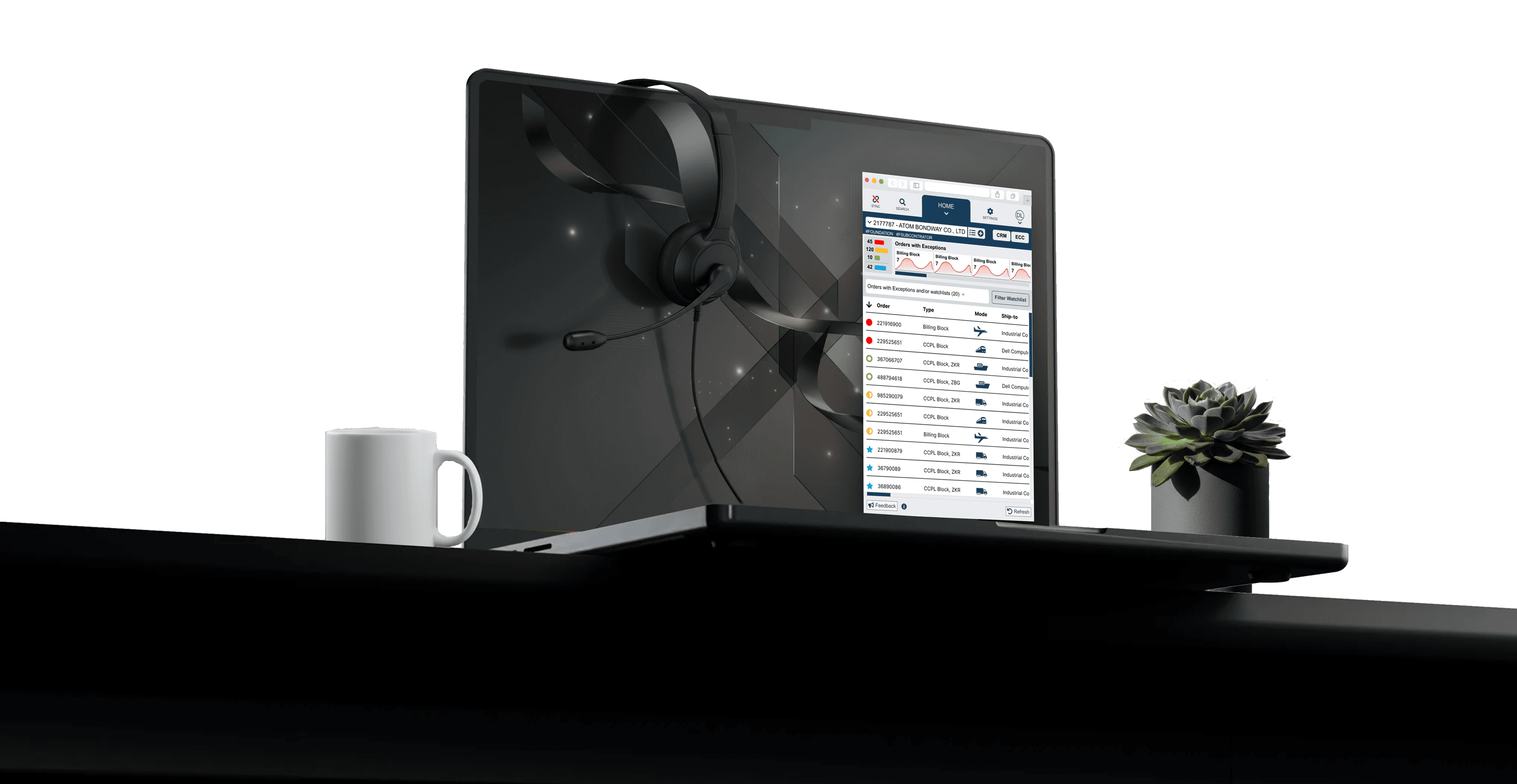
Initiated a redesign of the homepage data-viz element, over leaving a component the team had grown blind to . It was the most visible piece of screen real estate, and the responsive trade-offs weren't obvious until wireframed.

Problem signal

  • Wasted valuable real estate on top of the screen

  • Data does not fit the design

  • Cluttered desktop with many apps open, inconsistent screen controls, low trust in data.

  • Small niche of users spread across 4 similar tools.

User feedback

"Too many apps, its confusing"

"Similar tool inconsistent controls"

"I don't really trust in…"

What I owned

I built a responsive interface the across 3 types of device.
I built the component library.

What I did not own

The new app was a companion app - multiple apps in integrated into one interface.

Problem signal

  • Wasted valuable real estate on top of the screen

  • Data does not fit the design

  • Cluttered desktop with many apps open, inconsistent screen controls, low trust in data.

What I Owned

I built a responsive interface the across 3 types of device. I built the component library.

What I did not Own

The new app was a companion app - multiple apps in integrated into one interface.

User feedback

"Too many apps, its confusing"

"Similar tool inconsistent controls"

"I don't really trust in…"

Initiated a redesign of the homepage data-viz element, over leaving a component the team had grown blind to. It was the most visible piece of screen real estate, and the responsive trade-offs weren't obvious until wireframed.

Outcome

The new design fit cleanly across all screen sizes and Inspired use it as an interactive filter of the screen.

What I owned

Tradeoffs

Learnability requires more effort

Hidden labels require users rely on color pattern only.

What I owned

What I Owned

I built a responsive interface the across 3 types of device.
I built the component library.

What I did not own

What I did not Own

The new app was a companion app - multiple apps in integrated into one interface.

Outcome

The new tool fit cleanly across all screen sizes and Inspired me to use it as an interactive filter of the screen.

What I owned

Initiated a redesign of the homepage data-viz element, over leaving a component the team had grown blind to . It was the most visible piece of screen real estate, and the responsive trade-offs weren't obvious until wireframed.

Challenge

Problem Signals

Difficult systems → inconsistent action

Difficult systems → inconsistent action

Unblocking orders was a frequent high friction workflow.

Unblocking orders was a frequent high friction workflow.

Problem signal

  • high effort decision

  • high recall and spreadsheet used adds risk

  • mitigaions inconsistent

"I had to learn these codes in order to design screens, and it was hard to learn and hard to manage."
  • Rodney Echols, UX/UI Designer

"I had to learn these codes in order to design screens, and it was hard to learn and hard to manage."
  • Rodney Echols, UX/UI Designer

"I had to learn these codes in order to design screens, and it was hard to learn and hard to manage."

  • Rodney Echols, UX/UI Designer

What I owned

The legacy system approach wasn't learnable inside the 90-day mentorship window new CSRs already needed just to function.

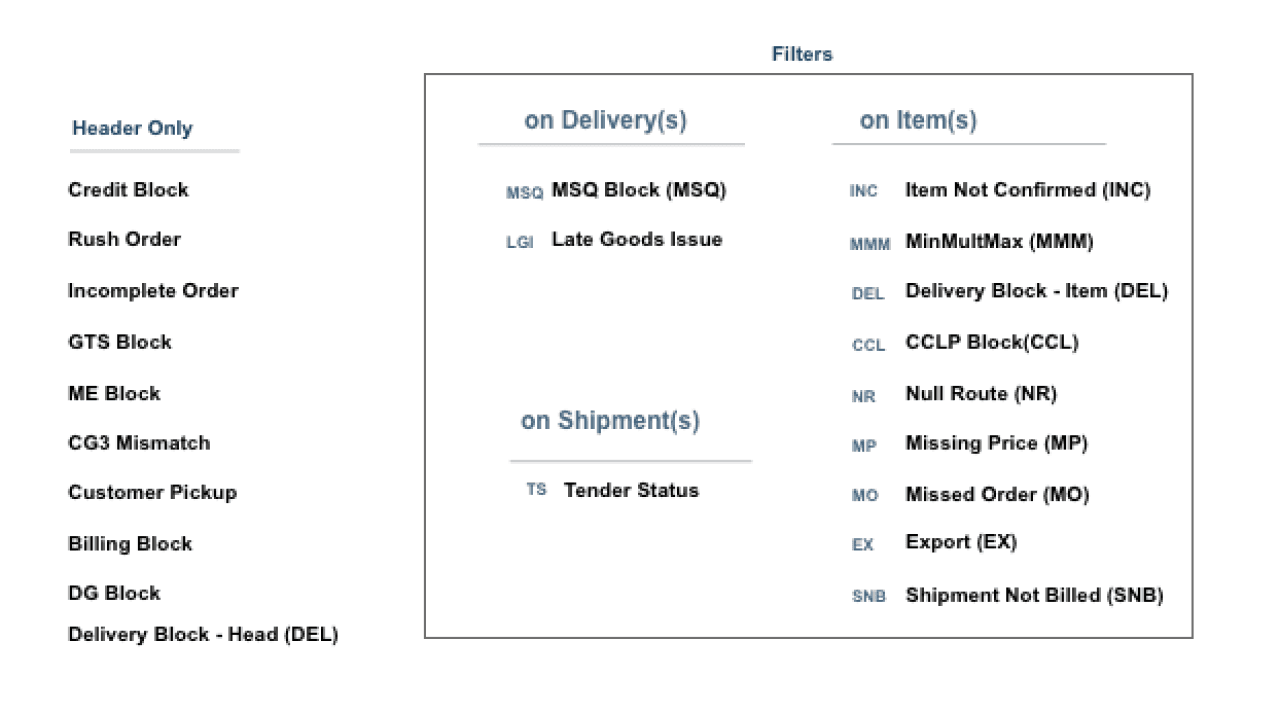
I applied the model I used to learn the codes as a content filter/lens framework to a dense, content-heavy screen.

Outcome

  • 3-4 fewer visual elements to process

  • 75% reduction of page density

my model to learn order codes

my model to learn order codes

Outcome

  • 3-4 fewer visual elements to process

  • 75% reduction of page density

  • I learned which codes to use inside 1 week

  • 3-4 fewer visual elements to process

  • 75% reduction of page density

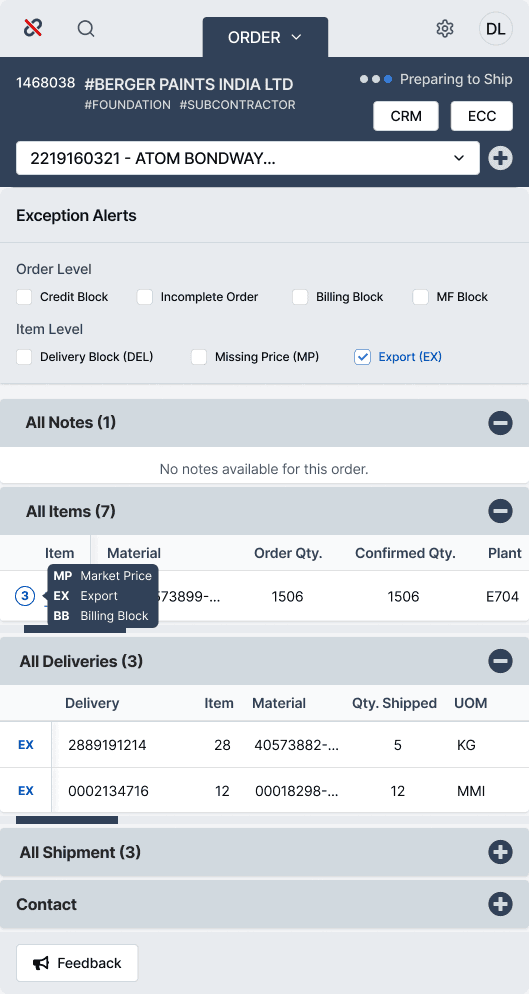
Key Components Designed for order screen

Exception Alert Types

Help CSRs prioritize urgency, complexity and how costly a blocker can be for their customer.

Instantly focus decision making

Level of Impact Order/Item

The scope of the problem could be used as a filter, (i.e. Single item impacted or Order level impacts multiple items);

Reduce noise on screen with a click

Blocker codes visualized

Symbols reduce the amount of information on the screen;

Multiple sources of data 1 context

Tooltip Identifiers

Short summary of the exception alert:

Reduces the reliance on human recall

Order Status

Stage the order provided context for the CSR;

Understanding of context of the situation

1
2
2
3
4
5

Order blocker Screen Design

Click hotspots to view parts

Order screen with orders

Outcome

  • 5-6x faster for users to scan

  • order blocker diagnosis:
    3 screens → 1 screen

  • remove the guesswork from issues

  • 5-6x faster for users to scan

  • Single screen blocker diagnosis

  • Removed guesswork from issues

Resulting order workflow

Find blocker

Diagnose

Filter order attributes

Next best action

Calculate remediation path

Update ETA

Recalculate delivery time

Delivery

Reroute

Select alternate transit

Shipping

Fix stock

Allocate safety stock

Inventory

Standardize case

Log resolved workflow state

Consistent action

Redesigns failed because they added tools without fixing how users actually worked. Ignoring real user needs led to more tools, more workarounds and less trust.

Redesigns failed because they added tools without fixing how users actually worked. Ignoring real user needs led to more tools, more workarounds and less trust.

What I'd Do Differently

"I'd design the UI kit around next-best-action resolution guidance instead of all-in-one data lookup — the lookup paradigm still asked CSRs to synthesize the answer themselves."

  • Rodney Echols, UX/UI Designer

"I'd design the UI kit around next-best-action resolution guidance instead of all-in-one data lookup — the lookup paradigm still asked CSRs to synthesize the answer themselves."

  • Rodney Echols, UX/UI Designer

"I'd design the UI kit around next-best-action resolution guidance instead of all-in-one data lookup — the lookup paradigm still asked CSRs to synthesize the answer themselves."

  • Rodney Echols, UX/UI Designer

Led 50+ stories over 14 months • 0-to-1 design

Led 50+ stories over 14 months • 0-to-1 design

Led 50+ stories over 14 months •
0-to-1 design

Skills Demonstrated

Simplifying complex work = 0 to 1 Reduced training needs cuts $600K in costs/ 8% unused user license = $4 million in expenses

Research synthesis under hard constraint

Decisions, Friction

Prototyping

UX Design, Wireframing,

User Adoption

Behavior Change, Actavtion

Root-cause reframing

Context, Friction

Systems thinking

Context, Friction

Design systems ownership

Design Setup

Design systems ownership

Design Setup

Agile Dev Handoff

Feasibilty Decisions, Testing

Rodney Echols | Staff Product & UX/UI Designer
About
Designer Profile
Staff Designer | Human Intent, Huge Impact
Case Study
Design decisions protect NPS
National Airline | Customer Experience Engine
Rodney Echols | Staff Product & UX/UI Designer
🔥 Browse all projects >>
Rodney Echols | Staff Product & UX/UI Designer
About
Designer Profile
Staff Designer | Human Intent, Huge Impact
Case Study
Design decisions protect NPS
National Airline | Customer Experience Engine
Rodney Echols | Staff Product & UX/UI Designer
🔥 Browse all projects >>

Enter case study password