Enter case study password
Modern Drilling Ops
I eliminated 40+ risk and hesitation signals

My Role
Lead Product Designer
What I owned
Design results from research through delivery phases
Establish system model, information architecture and interactive design approach
Architected UI design and implementation of design system
Research, testing and strategic sprint facilitation to create insights and clarity
Owned design decisions; balance goals of product, development and delivery teams
Prioritization of design roadmap; led handoff and interaction with engineering & PM
Fragmented 5 tool app suite
-> Single source of truth in 1 single app
Report cycle workflow takes 4 months
-> 6 hour days
Feeling based design results
-> Systemized design based in principles
Replaced legacy app in 5 of 7 countries in 6 months
“
— Halliburton Drilling Engineer
5
Separate Apps
100+
Regulated Tasks
High
Risk & Regulatory
Low
Productivity
On Prem
Software Limited Scale
Laggard
Market Postion
AI-Generated erodes design authority
The Challenge
A design lead proposed polished AI-generated screens days before sprint close. Accepting the work as is would have been faster and avoided debate.
I challenged the design in ways the team hadn't accounted for: wholistic system impacts, tradeoffs and how frequency changes user expectations. I led the team toward a workflow grounded in system logic.
Demonstrated
Balancing competing goals with taste
The Challenge
Development lead optimized performance. Product pushed for a modern experience. The initial UX direction favored a single interaction pattern.
I introduced context. I challenged the assumption that consistency always improves usability and I weighed interaction patterns to task frequency and consequence.
Demonstrated
Define ambiguous requests
The Challenge
Product asked for a "confident yet modern" feel with no measurable direction. The tension was design toward a mood, not a spec.
i turned a vague aesthetic ask into a structural system. i cut friction by reduce data-entry effort across the product. I made progress personal and rewarding, not just a status bar.
Demonstrated
Designing moments of pivotal decision to build user confidence & clarity
I spotted the same common struggles causing hesitation in moments of decision across the workflow.

1
Define
2
Assess Risks
3
Design & Test
4
Approve
choose well
uncertainty
build report
rework
input risks
judgement
➔
Manage projects on cloud server
➔
Name, manage, edit many versions of design
➔
Share work across multiple users
➔
Improved decision quality
➔
Clear action trigger from screen
➔
Create, Read, Update, Delete and other controls
What I owned
Outcome
↓ clicks
EFFORT
Performance
↑ adoption
REDUCED TOOL SWITCHING
Usage
"Make this app feel more modern and polishied"
What I owned

Workflow Build a Drilling tool
Drilling Tool
BHA Tool
Logistics
Customize
Preview Tool
Load Project
What I owned
Outcome
task completion
Efficient effort
Performance
globally connected
Unified Workspace
Global Connected
single workspace
Decision quality
Confidence Multiplied
3 features gave users the confidence to use AI

What I owned
Served as design engineer used well crafted prompts and Figma screen prototypes to design and iterate on the design. This was the second AI design pattern designed across our digital product line, and it was my strategy to use AI trust building elements. The legacy workflow was owned by engineers using human knowledge and experience, my concept was to use "human in the loop" design in this iteration to build trust in transition.
100%
positive user reactions
new design garnered excitement and users commented that AI flow would make this much more useable
Risk Score
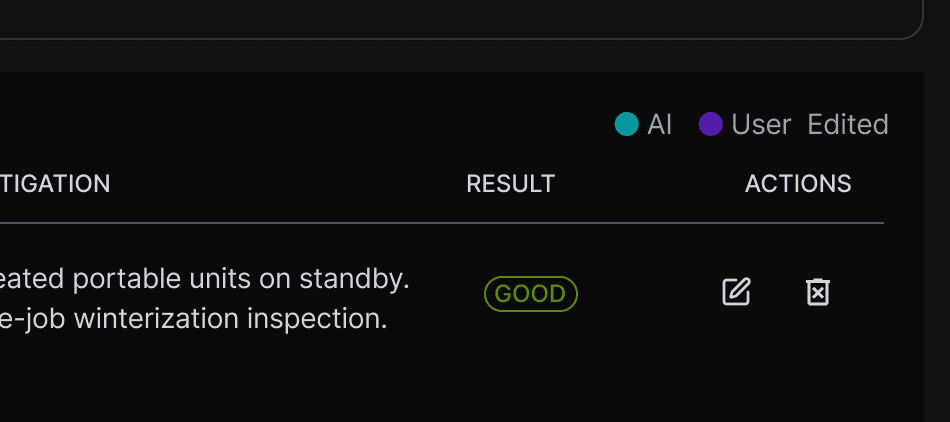
Because Engineers are right to be skeptical of AI suggestions have graded certainty visible on the screen. I built severity grade, frequency counts, and expanded rationale. No need to open spreadsheets to calculate.
Risk Visibility pattern
high
Lost circulation
82% Confidence
Found in 7/7 wells • [Rationale]
Deliberate user controls
Because constant screen refresh creates distraction and stacks up token costs, AI runs only when a button is clicked. Engineer stays in control.
restraint
AI Copiolt
Autosave
Review
refresh
AI
EDit
Ready
Completed
user • Date • Time
Frictionless undo
Because action are reviewed by multiple team mates with different points of view, every AI suggestion is undoable. Remove, edit undo. the view stays user-editable. Reversible actions removes the stall of making a decision.
REversible Decisions
Summary

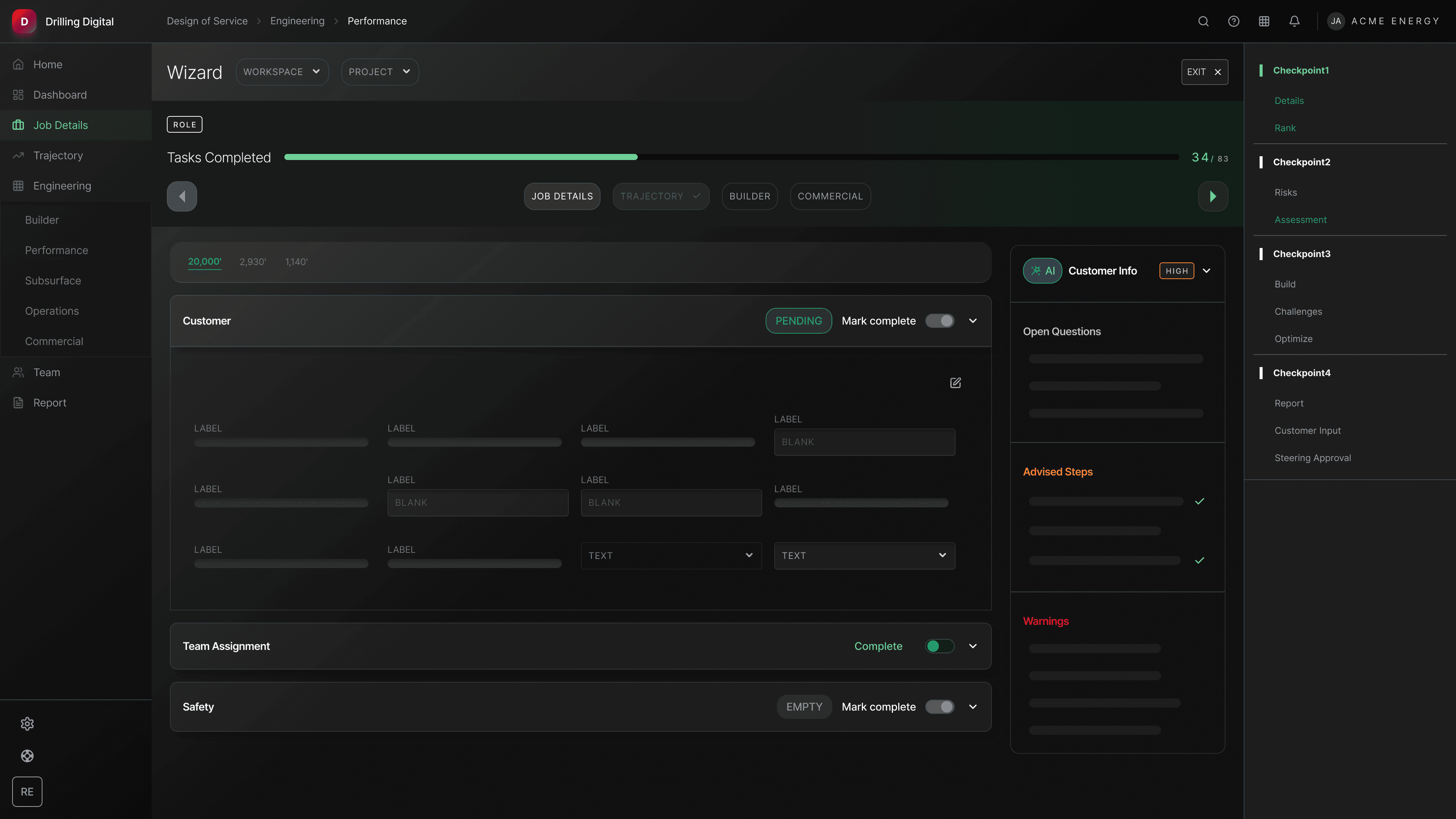


What I owned
32+ Stories
Survey Component Pattern
Table Component Pattern
Contingent Hole Section
Accidental Data Loss Prevention
BHA Modeling Phase 1
BHA Modeling Phase 2
BHA Modeling Phase 3
BHA Telemetry Tool
Risk & Challenges AI
BHA Layers & Lens
Well Montage Dash
Final Report
Trajectory Chart View
Well Schedule
API input components
Wizard Mode
Collaboration Hub Dash
Collaboration Hub Dash
Entry Page Polish
Decision Pattern Screen
BHA Builder Phase 1
BHA Builder Phase 2
Task Mode
App Tour
Copy/Duplicate Job
Primary Nav & Icons
Shipped & Live
Final Checklist
Status Panel & Mark Complete
Tier Rank
Page Navigation Pattern
Establishing user trust →
reduced resistance to change
The team stopped debating taste and started referencing the principles.
Human controls on AI →
reduced errors, task time, costs
Depth-based hierarchy made the next right move obvious on every screen.
Scalable design components →
boost team confidence and alignment
The unified stack became the team’s primary surface within the first week.
Efficient system →
focus quality and collaboration increased
The unified stack became the team’s primary surface within the first week.
Modern Look & Feel
Competitve
Personalized Workflow
Reduced Completion Time
Componentized Design
Scalable & Adaptive
Single System
Improved Learnability
5 → 1
17 → 5
~80%